 ForexRobotNation.com – Best Forex Robot & Expert Advisor Reviews Forex Robot, Expert Advisor
 Welcome to TWP VIP
This is my passion project, currently providing signals and educating THOUSANDS of traders daily!
By joining & using TWP VIP, you agree to the terms of service & disclaimer.
If you ever need to check your subscription to see how much time you have left, go to https://t.me/TWPVIPBot and click 👉 STATUS
👉 Make sure you subscribe and hit the bell 🔔 for weekly trading lessons to help you get the most out of the VIP room!
👉 Subscribe now: https://bit.ly/FRNsubscribe
👉 Follow My Instagram for Trade Updates: https://www.instagram.com/fxtradewithpat/
I provide both Forex and GOLD signals in 2024.
Forex Broker for Forex Signals
| Image | Min. Deposit | Rating | Countries | Sign UP |
|---|---|---|---|---|
 BEST 2025 🏆 | $50 | ALL Countries & USA (MetaTrader - Regulated) | ||
 | $30 | ALL Countries & USA (MetaTrader) | ||
 | $10 | ALL Countries |
Free Trade Copier
You can now copy all the VIP signals directly to your trading account.
Updated 06/25/2025
By downloading the TWP VIP Free Trade Copier, you agree to the terms of service & disclaimer.
You can set TP1 only, or TP2 only and then manage that trade as it goes.
I don’t recommend opening 2 positions, 1 for each take profit level. I find this method unprofitable.
Every trader is different, so how you like to use our signals, will be different from other traders. Find what works for you, and profit with us!
If you have any issues with the Copier I suggest moving to the MT4 version, as that’s the version that I use.
NEW: Select Channel! (works for GOLD as well)

Watch these videos to learn how the copy trader works.
Frequently Asked Questions (About Trade Copier)
Thanks to our VIP family member Mark R. 🏆 for writing the majority of the FAQ!
The Trade Copier is software that takes signals from the VIP member’s area and copies them to the member’s trading platform.

VIP members install two pieces of software on their Meta Trader 4 platform. First, they install a Telegram connector, currently named TelegramToMT4. Second, they install the Forex Robot Nation Copier v1_00 in the appropriate folder. Complete installation instructions are included with the software download.
Yes. Everything needs to be open!
MT4, The TelegramToMT4 & Telegram itself need to be open in order to receive trades. All of these programs can be minimized, and they will still work.
You need to be a VIP member in order to receive trades.
If trading GOLD in the GOLD room, you will want to set your PIP TOLERANCE to 20.
Just double click on the account file in the same folder as the Telegram_Connector.
You can enter the correct phone number, like if you forgot to put a +1 or something.

There is no reason to turn off a computer in 2022. They are built to be left on.
But, if you want a separate server for your copy trader, or your robots, you can pay monthly for a VPS.
These are the two VPS companies I use:
Worldwide Clients:
United States Clients:
A VPS is just a computer on a high speed network. You can connect to your VPS from your phone or your computer at anytime to change settings, monitor results etc. The server stays on 24/7.
Installing files to a VPS is very easy, you simply login to your VPS, then you will see a desktop just like your own. You will be able to open the web browser on the VPS, go to websites, download robots, copy traders and install them normally.
When getting a VPS, you just need to make sure it’s Windows. Start on one of the lower plans, you can always upgrade later if you want to add more robots / copy traders on your server.
It is important to see a blinking cursor inside of TelegramToMT4, if you do not see this blinking cursor, it means that TelegramToMT4 is PAUSED. Simply, click your mouse inside of the TelegramToMT4 window and you should see blinking again.
MS DOS has a Quick Edit Mode that pauses all processes when you click anywhere inside the command prompt window. Quick Edit Mode is enabled by default on most Windows machines so you have to disable it by going to Properties in the window and deselecting it. Once I disabled this the problem seems to have gone away.
Right click at the top of the window.
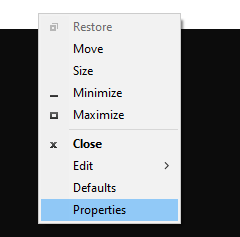
Untick the quick edit mode.

This is not always the case (we have reports that it can work without a blinking cursor)
One VIP member said the program was crashing because he forgot to add +1 for the country code.
After he did this, it stopped crashing.
If you want the copier to open a trade exclusively for TP1 or TP2, simply put -1 in the Lots TP1 or Lots TP2 above.
In the image below, since -1 is in the Lots TP2 section, the copier would only open a single trade for TP1 at 2%. It would not open a trade for TP2, because -1 is in the Lots TP2 section.
Using TP1 only, is a low risk way of using the VIP copier.

Your chart should look like this, with a happy face.

You need to allow autotrading / live trading.


Go to Tools > Options

Then click Expert Advisors tab and Allow Automated Trading

Or Right click on your chart, go to expert advisors > properties

Then go to the common tab and tick Allow live trading
This will resolve the sad face issue.
You only need to install the Forex Robot Nation Copier on 1 chart.
You DO NOT need to install it on every chart.
In these cases you need to add a suffix. This is shown in the video above.
So next to suffix you would enter .HKT or i

box color=”black” align=”aligncenter” class=”” width=””]I can’t enter my password into Connector[/box]
If you can’t enter your password into the telegram connector.
Just simply type and press enter.
The password is just hidden for privacy purposes.
If you struggle with doing it this way then put your password in a notepad, then copy it (Ctrl + C), and paste it (CTRL + V) into the connector that way.
I actually had to do this myself, and it works.
Yes, the MAC installation guide is now included in the ZIP download file.
This installation guide was graciously provided by our member Joey G 💪
The number one issue our VIP members face is “missing the signal.” So, we wrote this software to “copy and paste” the signal to their trading platform for them. It does this while they are working, driving, eating, sleeping, spending time with family and friends or watching Trade with Pat videos 🙂
VIP members only who are serious about trading.
Currently, it’s included with the membership. You’re welcome.
Join the VIP group and follow the setup instructions.
The Trade Copier is ideal for those traders who are trading multiple signals a day. It does not make sense for inactive traders.
You are. You have always been responsible for losses, poor risk management and any other risky behavior in the market.
No. Many of our members use these signals to grow their accounts. Some, quite successfully. Even with the fantastic results our members see in the VIP group, it will not make you rich. Trading is a disciplined skill and only the most elite traders are able to become unreasonably wealthy by trading. However, if you want to grow your account and “earn while you learn” then VIP membership and the Trade Copier could be ideal for you.
Currently, we report results based on the best conditions of a single position.
Which is why, we recommend opening 1 position at a time, and managing the trade to the best of your ability.
If a trade hits SL it is triggered at -1%.
If a trade hits TP1 it is reported at +1%.
If a trade hits TP2 only TP2 is reported, so 2-3%, whatever the TP2 is.
So, if a trade hits TP2 and the TP2 is 3%, we don’t claim the trade won +4%, the same way we don’t claim -2% if we hit a SL.
I do believe this is the best way of reporting because it is in line with how the majority of our clients use our signals, and with proper trade management, these are the best possible results.
1) Check blinking white cursor on script
2) Check if that specific message was parsed corrrectly and visible into the script window
3) Check on MT4/MT5 if that signal was handled correctly
Solve problems
1) you have accidentally paused the script
2) internet connection problems or copier possible problem due to bad message format
3) if signal not arrived to metatrader, copier is very probably not installed correctly
If all 3 steps are ok, no reasons for not seeing trades opened rather than broker related or misconfiguration problems (like opening 100 lots with $100, set acceptable lot sizes / risk %)
The Main Trading Strategy Used in VIP
If there is anything else you would like to see in here, any questions, anything at all. I will make specific videos for each.
I look forward to growing your accounts!
Much love.


Hi,
I received a “EUR/AUD Update: Stop Loss Moved To Entry Price” in Telegram and at the same time a breakeven signal in Telegram. But it didn’t change the Stop Loss on my EUR/AUD trade. Is there something I missed?
Thanks! 🙂
what would you recommend to be the minimum amount someone should put in their trading account for this to work?
Hello Patrick,
Something which could be cool is an option that allow BE of TP2 immediately after TP1 is reached.
Greate copier and signal so far !
Again my trades were not filled. I already lost 4 pofitable trades.
I use same brooker as you ECN PLUS. Where is the problem?
Hi Libor, please trouble shoot using the FAQ. Check your journals, check your experts, check your logs. There are no issues on our end at this time. Make sure you aren’t trading a lot size too large for your account etc.
I repeat it over and over.
Jurnals is clear.
Expersts works coreectly.
Logs are clear.
Todady: NZD/CHF PT1 HIT Correctly. PT2 profit unfulfilled.
This happens repeatedly. I tried three differnet brookers >> SAME results.
I don’t have this issue, and if I don’t have an issue it’s hard for me to guess what’s causing an issue that I can’t reproduce.
Telegram connector received signal (AUDCAD) with SL at 0.89170. Your signal at the telegram channel also SL at 0.89170 (I am sure about it because i write it down to my fx journal). But it seem you edited to 0.89100 (with has been hit). Do you forget to remind us to change it manually?
I’ll check with the team.
Hi Pat,
Have you check it?
Thanks
Hi, it is possible to put the link for the software telegram to mt4 into this chat? There are many software thats sounds like telegram to mt4. kr
HI, this copy trader telegram to MT4 is already on this page just scroll up.
How can I get support for installing the Trade Copier on my VPS or on my Mac?
Hey Pat,
my account only opened 1 trade with the TP2 and it is set 1% risk for TP1 and 1% risk for TP2.
How can I put it opening 2 positions, one for TP1 and another for TP2?
Thanks in advance.
Set a % for both in the settings.
How do I know that the signals I receive are actually set in Metatrader? I can see the Trades in the connector but I don’t see them as open trades in Metatrader.
Check the FAQ / trouble shoot section to see why they aren’t adding.
I have just started setting up the EA on my Cloudy VPS. I am getting an error when trying to run the Telegram Connector. “This program can’t start because api-ms-win-core-path-|1-1-0.dll is missing from your computer. Try reinstalling the program to fix this problem.
I am not sure what program I need to reinstall. I have the desktop version of Telegram version 4.0.2 x64 installed on the VPS.
Any ideas?
-Greg
What did the VPS company say about this file?
Pat
I have install the copy trader and when doing the login part in Telegram connecter it will not take my password…tele # added , then code … which i can type all those then the cursor does nothing… i have tried this numberous times and now it just crashes…what can i do?
Check the FAQ, there was someone that solved this issue.
Hi Pat,
I see you posted in Telegram about some people complaining about their trades not being triggered (or the other way around) with the EA the same as yours because of the variation in different broker’s pricing (which makes sense).
To mitigate this issue somewhat, if a signal gets cancelled (but some of us subscribers trades get triggered and end up in a loss), would it be possible to send a “close order” signal through the EA at the same time. That way if my signal was open it would be hopefully closed for a smaller loss than the SL.
Just an idea. Thanks.
Hey Patrick 🙂 quick question, if i wanna run this on multiple MetaTrader accounts I run with two different brokers and I have two metatrader windows up, do I need to have two telegram connectors running? or will this make problems for me ?
Yes two connectors would need to be running for this, the connector installed to that platforms mql4 folder.
Pat, what if the dash cursor is not blinking. It shows that i am connected to telegram. But the cursor is not blinking.
I’m not sure, I’ve got a few emails about this, still waiting for them to test and respond.
Hi I have a question Patrick. If we are stopped out on trades is this not a 2% loss as there are 2 trades set up?
That depends on your trade management, please make sure you watch the members area intro video, every VIP new member should watch that to understand trade management.
Hey Pat, Love the work done. My current broker is not working for me and i was looking at the brokers suggested above. For hankotrade what account would you recommend getting with a 5k usd account size.
Hi Daniel, ECN Plus
Hello,
I have read the manual on the parameters. What I want is that when a trade is received , it creates two positions each with a SL risk of 0.5%.
The first position will have TP1 set, the second position will have TP2 set.
Therefore, if SL hit I lose 1%, if TP1 hit I win 0.5%, but if TP1 and TP2 hit then I win 1.5%.
What configuration needs to be setup in the parameters to accomplish this?
Thanks.
Hi Alex, you would set .5% for both risk levels if I’m reading this properly.
Hey pat, which leverage should I use on my trading account? I currently use ICMarkets.
That’s up to you. Test a week or two, get a feel for what you prefer. Everyone has different risk preferences.
Hi Pat,
Copier is working OK for me, except the issue you have mentioned around cancelled trades not happening for everyone and the trades actually get triggered. This has caused me to have trades hit their stop loss but at this point I am trading a demo account until I have fine tuned the parameters to suit me so no harm done. Is it possible that when you send the cancel message for the order you also send a close message, that way anyone who has had a trade trigger will minimise their loss?
Also the Mac install, that’s all good for putting the EA on an MT4 chart on a mac but the telegram connector is a .exe file, that will not run on a mac so the signals will never be received or triggered. The only way to run a .exe file on a mac is to install third party software.
Why can’t your trading be copied? Its much more efficient.
Thank you.
They can be copied Abraxas, that’s what the copier does. It’s working for over 90% of our clients. There are a few clients having issues, but all the issues seem to resolve themselves through the FAQ or trouble shooting process.
Why are you lying about your Signals? CJ and GU has clearly triggered and went into Stop Loss, but in your telegram, you claimed to have cancelled the orders rather than them hitting Stop Loss. And the PA is huge so don’t make false claims about different brokers having different prices. Here I thought you were an honest person.
Hi Thomas, it’s okay to discuss these matters, but don’t call into question my honesty. I can show you 50 examples where trades didn’t trigger by 1 pip that turned into wins that we didn’t claim. This is a long term service, there is no reason or no gain for us to be dishonest. It wouldn’t serve us in any way and would only cost us business. I have attached proof of the trades you call into question, showing that they weren’t filled.
CADJPY

GBPUSD

Cancellation Time

Mine was filled too and it ended in a loss. Pat, perhaps you should do a poll and find out how many of the member’s had their orders filled. If majority had theirs filled then we may have a potential problem here. And counter measures may be necessary.
What kind of counter measures could be completed though Aru? The price is the price.
Dont forgett the spreads + 2 pips thats why we our pending orders were triggered.
I’ve been with FRN VIP for 8 months.
They do not manipulate trades.
My accounts have seen significant gains from these signals.
If you spend 30 minutes going through old signals you will see that this an honest group. I’m happy to be part of it, and I’ll be upgrading to lifetime when my 1 year membership is up.
Fantastic Daniels, totally agree. I’ve never seen anything but honesty always from Pat and the team. Onwards and Upwards 🙂
Hey Patrick, can you please help me? The telegram connector is not blinking although it says is connected to my telegram. What can I do?
It may work without blinking in some platforms, let’s see.
If you’re connected through VPS you might not see it blinking, but it would be working.
Hi Pat,
some of the trades are not filled. I use same booker as you – Hankotrade ECN PLUS.
I trade using your robot. The results are diametrically opposed.
Thank you.
Read the new troubleshooting section of this page please.
Hi Patrick
I installed the software as per the instructions , telegram connected but nothing is happening any advice?
Check the new troubleshooting.
Dear Pat,
Is it ok if I manually adjust market or pending order to compensate my brokers huge spread. The EA only refer to the ticket not the price, right?
Thanks
Hi to all.
Only to say that I just found that the zip file contents have changed but the version of the file itself remained unchanged to 1.01. Please use versioning of the zip file and even of its contents accordingly or we will go mad trying to figure out and resolve the issues.
Thanks.
The latest download is the latest version Mario.
Hi Patrick, yes but its content changed without changing the name of the zip file also. Now its name is always the same (1.01) as the previous two ones but maybe with different contents: I have to dowbnload it and install again to be sure I have all updated at the latest version. If something change please make a 1.02 version. Thanks.
I have did everything else right its just not leting me type my password in please help
The password field is hidden, type and press enter. It will still type, it won’t show because it’s hidden for privacy.
That worked thank you Pat. You always know what to do!!!!!
I’ve tried going through all the Faq checks. I’ve re installed the files twice. Every time I get to the password part it doesn’t let me type or copy and paste. What do I do?
Is it also working on Mac or only windows?
It can be used on MAC. One of our members created a MAC install guide, I’ll be adding shortly.
I have the telegarm program and mt4 ea installed as directed and logged in. Both with the telegram program showing “connected to telegarm” and mt4 ea with smiling face. However with in the last week and today when trades are showned on telegram sometimes it shows on the telegram sometimes it does not. And when it do, they never get executed though mt4. Any help? Also today i received this on the telegram program : Warning:telethon.network.mtprotosender:attempt 1 at conntecting failed : timeouterror.
Not a single trade copied with version 1.0 installed
Install the new versions please.
Still have not seen any trades on the copier and I have everything hookup and showing it working (setup right). Are you not sending the trades out though the copier. Not sure which trades are sent . But anyway not working on my end. Great idea if I can get the trades.
Yes, all trades are automatically sent. Make sure all the programs are running / minimized and that the computer is running too.
I have all theses things check ✔️ . Will see what happens this week. Today is Wednesday and still nothing has happened.
Programs are running
Minimized
and computer running.
Hello, my previous message was removed :/
I have installed everything properly as instructed (i am tech savvy)
TG signed in on both the TG application and the Trade copier
I am receiving signals in the open window
Smilley face is showing on chart, autotrading on
still no execution for the trades
using windows server 2022 can anyone help?
I have never removed any message from here, maybe wait for moderation.
Make sure all programs are open and running, telegram, copier, telegram copier etc.
Sorry Pat for this it just took ages to show up. You indeed did not remove my message.
I managed to fix it, symbols problem.
Now everything is running well, except when you send a breakeven signal, i am doing that manually.
So i have set up the bot perfectly, using + for phone number, live trading is on, i have telegram open also, the smiley face is on, followed everything and i am receiving signals on the BOT, but nothing is happening on the MT4, i reinstalled, also, using windows server 2022
It is working perfectly on my end, I’ll have to keep looking into it.
Pat – What would possibly cause my MT4 account to not always take the trade from the copier? My Telegram is always connected. I get the blinking cursor. The Telegram Connector shows all the trades that you take…but my MT4 takes some of them…but not all. Any idea?
I am having the same issue.
ok i will try this again,
i installed the telegram connectorfolder in the area you specified and added the .ex4 file to the xau trading window. then when I double click the connector file the window opens and after a few seconds closes.
Hallo,
i downloaded and installed the copytrade (mt4) and everything looks fine. Expert and files copied to mt4 correctly, smiling face, auto trading on(green), dll allowed, registration with phone number done. I open the app and it reports that it is connected to telegram. And the app correctly receive the orders. Only thing is that the orders are not opened on mt4. I am trying the copier on a demo account in us dollars, thanks.
Fabrizio Mardegan
P.S. i use a vps correctly working and tested platform
I am having the same issue, and too and using demo usa broker. (Hankotrade)
Hey Patrick. Could you update the .pdf file with the new features ?
Cheers
hi, how much leverage do u usie? and how much leverage do u recommend using ?
Hi Pat
Thanks for quick response, it’s highly appreciated.
Hi Pat
Well i’m from Namibia in Africa.Just want to know if i’m doing it right with the Telegram Copier.When i enter my Phone number i put it like this…+264811456961 the +246 is my country code and then i enter the passcode eg:87134 or is it my Telegram password instead,cause i hear you says password.So maybe something is not done correctly Mr P.
This would be your telegram password.
hey Pat,
i just signed up and I’m trying to add the trade copier to my trade platform. when I open the telegram connector I see the window open then I enter my phone number then when I get to the password section I try to enter my password and any button I press wont work.
Hi Pat, thank you for the effort that you put into creating this EA. 2 questions.
1. Every signal you send, it does it twice .. wondering which configuration I may need to adjust
2. I was wondering if there is a way I can do test signals with the tools you gave us. I want to adjust certain parameters to see how it will react when I send the signal vs me waiting for the signal (if you understand what I mean)
thank you again
1. 1 trade for TP1 1 trade for TP2. See FAQ for how to choose only 1 TP.
2. Backtesting old signals in the group? Not possible yet.
Have it setup with everything but have not had any trades or alerts
Hi Patrick,
Do you know if it is possible to get Telegram_Connector to run at startup. I copied program over to pc startup folder but it runs a stand alone copy, without my account number.
Cheers
Ya put it in your startup folder, I did.
create a shortcut for the Telegram connector in MT4 data files and put the shortcut in startup
Everything seemed like it was setup correctly; but the ea didn’t take the two trades earlier this morning.
Try re-installing. My computer reset, so I missed the trades and can’t see anything to assist.
Hi all. Im new here and i would like you to share your best settings for COPY TRADER ( SETFILE) that u are happy with it. For now i have only selected TP 1 and TP 2 % RISK FACTOR as this is my first time i choose 0.005% i dont want to risk more then 0.01 LOT i want to be sure first how this is all work. So please share your settings with me if u can 🙂
You can use lot size, the two fields above the % fields.
Thanks
Ea didn’t tale the two trades that the bot gave. Everything looks correct
hey pat, i put my phonenumber in, but never get an code to enter.
Hi Pat,
Today’s pending signal on GBPAUD not trigerred because of my broker’s huge spread. Is there any setting to compensate the spread at the copier EA?
Thanks
Hi Pat I have the copy Trader now for almost two weeks but can still not use it.The problem is at the Telegram2MT4copier.It is not activated when i put the code in.This is the 5 Digit code eg: 92438 i put in everytime but it still shows Invalid Code. Please Try Again.Please Boss only you might assist me in this matter.I have subscribed only for 1 Month.For me is only to get it working before the my Month is over.When its working i wish to subscribe again for a longer period of time cause this is the thing iv’e been looking for.
Hi Clive, I’ve never seen this issue. If I can recreate it somehow I’ll let you know.