 ForexRobotNation.com – Best Forex Robot & Expert Advisor Reviews Forex Robot, Expert Advisor
 Welcome to TWP VIP
This is my passion project, currently providing signals and educating THOUSANDS of traders daily!
By joining & using TWP VIP, you agree to the terms of service & disclaimer.
If you ever need to check your subscription to see how much time you have left, go to https://t.me/TWPVIPBot and click 👉 STATUS
👉 Make sure you subscribe and hit the bell 🔔 for weekly trading lessons to help you get the most out of the VIP room!
👉 Subscribe now: https://bit.ly/FRNsubscribe
👉 Follow My Instagram for Trade Updates: https://www.instagram.com/fxtradewithpat/
I provide both Forex and GOLD signals in 2024.
Forex Broker for Forex Signals
| Image | Min. Deposit | Rating | Countries | Sign UP |
|---|---|---|---|---|
 BEST 2025 🏆 | $50 | ALL Countries & USA (MetaTrader - Regulated) | ||
 | $30 | ALL Countries & USA (MetaTrader) | ||
 | $10 | ALL Countries |
Free Trade Copier
You can now copy all the VIP signals directly to your trading account.
Updated 06/25/2025
By downloading the TWP VIP Free Trade Copier, you agree to the terms of service & disclaimer.
You can set TP1 only, or TP2 only and then manage that trade as it goes.
I don’t recommend opening 2 positions, 1 for each take profit level. I find this method unprofitable.
Every trader is different, so how you like to use our signals, will be different from other traders. Find what works for you, and profit with us!
If you have any issues with the Copier I suggest moving to the MT4 version, as that’s the version that I use.
NEW: Select Channel! (works for GOLD as well)

Watch these videos to learn how the copy trader works.
Frequently Asked Questions (About Trade Copier)
Thanks to our VIP family member Mark R. 🏆 for writing the majority of the FAQ!
The Trade Copier is software that takes signals from the VIP member’s area and copies them to the member’s trading platform.

VIP members install two pieces of software on their Meta Trader 4 platform. First, they install a Telegram connector, currently named TelegramToMT4. Second, they install the Forex Robot Nation Copier v1_00 in the appropriate folder. Complete installation instructions are included with the software download.
Yes. Everything needs to be open!
MT4, The TelegramToMT4 & Telegram itself need to be open in order to receive trades. All of these programs can be minimized, and they will still work.
You need to be a VIP member in order to receive trades.
If trading GOLD in the GOLD room, you will want to set your PIP TOLERANCE to 20.
Just double click on the account file in the same folder as the Telegram_Connector.
You can enter the correct phone number, like if you forgot to put a +1 or something.

There is no reason to turn off a computer in 2022. They are built to be left on.
But, if you want a separate server for your copy trader, or your robots, you can pay monthly for a VPS.
These are the two VPS companies I use:
Worldwide Clients:
United States Clients:
A VPS is just a computer on a high speed network. You can connect to your VPS from your phone or your computer at anytime to change settings, monitor results etc. The server stays on 24/7.
Installing files to a VPS is very easy, you simply login to your VPS, then you will see a desktop just like your own. You will be able to open the web browser on the VPS, go to websites, download robots, copy traders and install them normally.
When getting a VPS, you just need to make sure it’s Windows. Start on one of the lower plans, you can always upgrade later if you want to add more robots / copy traders on your server.
It is important to see a blinking cursor inside of TelegramToMT4, if you do not see this blinking cursor, it means that TelegramToMT4 is PAUSED. Simply, click your mouse inside of the TelegramToMT4 window and you should see blinking again.
MS DOS has a Quick Edit Mode that pauses all processes when you click anywhere inside the command prompt window. Quick Edit Mode is enabled by default on most Windows machines so you have to disable it by going to Properties in the window and deselecting it. Once I disabled this the problem seems to have gone away.
Right click at the top of the window.
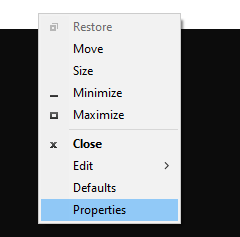
Untick the quick edit mode.

This is not always the case (we have reports that it can work without a blinking cursor)
One VIP member said the program was crashing because he forgot to add +1 for the country code.
After he did this, it stopped crashing.
If you want the copier to open a trade exclusively for TP1 or TP2, simply put -1 in the Lots TP1 or Lots TP2 above.
In the image below, since -1 is in the Lots TP2 section, the copier would only open a single trade for TP1 at 2%. It would not open a trade for TP2, because -1 is in the Lots TP2 section.
Using TP1 only, is a low risk way of using the VIP copier.

Your chart should look like this, with a happy face.

You need to allow autotrading / live trading.


Go to Tools > Options

Then click Expert Advisors tab and Allow Automated Trading

Or Right click on your chart, go to expert advisors > properties

Then go to the common tab and tick Allow live trading
This will resolve the sad face issue.
You only need to install the Forex Robot Nation Copier on 1 chart.
You DO NOT need to install it on every chart.
In these cases you need to add a suffix. This is shown in the video above.
So next to suffix you would enter .HKT or i

box color=”black” align=”aligncenter” class=”” width=””]I can’t enter my password into Connector[/box]
If you can’t enter your password into the telegram connector.
Just simply type and press enter.
The password is just hidden for privacy purposes.
If you struggle with doing it this way then put your password in a notepad, then copy it (Ctrl + C), and paste it (CTRL + V) into the connector that way.
I actually had to do this myself, and it works.
Yes, the MAC installation guide is now included in the ZIP download file.
This installation guide was graciously provided by our member Joey G 💪
The number one issue our VIP members face is “missing the signal.” So, we wrote this software to “copy and paste” the signal to their trading platform for them. It does this while they are working, driving, eating, sleeping, spending time with family and friends or watching Trade with Pat videos 🙂
VIP members only who are serious about trading.
Currently, it’s included with the membership. You’re welcome.
Join the VIP group and follow the setup instructions.
The Trade Copier is ideal for those traders who are trading multiple signals a day. It does not make sense for inactive traders.
You are. You have always been responsible for losses, poor risk management and any other risky behavior in the market.
No. Many of our members use these signals to grow their accounts. Some, quite successfully. Even with the fantastic results our members see in the VIP group, it will not make you rich. Trading is a disciplined skill and only the most elite traders are able to become unreasonably wealthy by trading. However, if you want to grow your account and “earn while you learn” then VIP membership and the Trade Copier could be ideal for you.
Currently, we report results based on the best conditions of a single position.
Which is why, we recommend opening 1 position at a time, and managing the trade to the best of your ability.
If a trade hits SL it is triggered at -1%.
If a trade hits TP1 it is reported at +1%.
If a trade hits TP2 only TP2 is reported, so 2-3%, whatever the TP2 is.
So, if a trade hits TP2 and the TP2 is 3%, we don’t claim the trade won +4%, the same way we don’t claim -2% if we hit a SL.
I do believe this is the best way of reporting because it is in line with how the majority of our clients use our signals, and with proper trade management, these are the best possible results.
1) Check blinking white cursor on script
2) Check if that specific message was parsed corrrectly and visible into the script window
3) Check on MT4/MT5 if that signal was handled correctly
Solve problems
1) you have accidentally paused the script
2) internet connection problems or copier possible problem due to bad message format
3) if signal not arrived to metatrader, copier is very probably not installed correctly
If all 3 steps are ok, no reasons for not seeing trades opened rather than broker related or misconfiguration problems (like opening 100 lots with $100, set acceptable lot sizes / risk %)
The Main Trading Strategy Used in VIP
If there is anything else you would like to see in here, any questions, anything at all. I will make specific videos for each.
I look forward to growing your accounts!
Much love.


Hi Patrick, Just to let you know that I set up your Trade Copier and all is working well.
Great job, cheers
I have not been able to get it to work properly, when enter my phone number it says debug then closes down.
This is resolved in the FAQ by adding a +1
this +1 aplies only to US phones, right?
Hey all – did the AUD/USD trigger on the copier to MT4 today?
Hello all, in my case the TelegramToMT4 isn’t blinking as it says in the FAQ. I just installed it a few hours ago, so it isn’t receiving its first signal yet, let’s wait and see if it works fine when it receives its first signal.
More information:
-The graphic does have the smiley face.
-And yes, I’ve received the Telegram code with no problems, on the screen it says “Connected to Telegram.”, but the white line at the botton doesn’t blink, despite having the cursor over it.
Thanks
Dumb question.. did you enable auto tradin in MT4/5?
did you resolved your problem? i me having the sabe issue
Hi Pat
Are you still having problems with the copier closing trades? The NZD/JPY trade didn’t close for me and ended up hitting it’s stop loss. The message was received in the telegram connector just didn’t trigger in MT4.
Thanks
Dave
Try redownloading / reinstalling the .exe
Hi Pat My MT4 is not taking trades? I have the message in my Telegram To MT4 and its blinking. I have the Smiley Face on one Chart in MT4. I did redownload and install the Experts.
Hey Patrick – saddled up on the copier. Got a happy face, got a telegram notification, but did not have the 2 trades placed. Q – will the copier work on a demo account? Q – my mt4 has both AUDCHF and AUDCHF.i listed I’m not sure which one to choose. I had the copier set to .i can I try AUDCHF without the .i on a different chart on the already open MT4 at the same time? Thanks John
Pick whichever has better spread.
Not about the spread Patrick – just trying to get the copier to work.
Hi John, on one of the FAQ’s, it said be sure to put in the country code, in your case I tihnk it might be Australia based on that you’re using AUD as a guess. Try to pu +61 in front of your mobile, if you haven’t, hope it might help, otherwise I’m not sure.
Dear Pat,
mt5 trade copier is working fine. You did great job !!!
by “Closed buy order manual” the trade stay open, did not react.
in trade telegram connector there was signal, only mt5 did not react.
probably minor issue
wish you all best.
Try re-downloading / reinstalling.
Hi Pat…its now for more than 5 days i’m unable to receive sigals through Telegram Copier as it show every time
Inval code. Please try again.Maybe i’m doing something wrong.
Hi Pat,
Last week trade copier was working fine. Today, the USDCHF trade did not activate. It showed on the Telegram copier but did not activate the trade. Any idea?
All the ideas / information about this is in the FAQ above Paul
I say connected to telegram with my name there also the cursor is also there but isn’t blinking, above says waiting for message. before I didn’t leave this screen open so I unsure if its right. Does it sound right to others that are logged in correctly.
that is happening to me. What did you do? Do you resolved your problem?
I just download the update (v1.01) and set the BE to 50% when TP1 and TP2 target reached. Hope it works as expected.
Hi Pat…You did’nt answer my question about the VPS.Is it mandatory to have one for the Copy Tradrer or not.
No, it is not required.
Hey pat what time frame should I use
Shouldn’t matter.
Hi Pat..just wanna know if you i use the trade copier… should i have a VPS for the copier or not.IF you should have one please recommment a cheap or even free good one.
HI Clive, if you’re in the US can use https://forexrobotnation.com/interserver-forex-vps-review-1-rated/
Thank you for doing this! Copier is working great and hasn’t missed anything yet. The only very small issue I have is the copier takes a 2nd trade with a micro lot (.01), which I simply close and let the original trade run at 1% risk. This is obviously a user error, but I’m not sure where/how to fix it. I’m looking to take 1%, pull SL to BE at TP1, and then let the trade play out. Any chance you could assist?
My settings are:
Lots TP1 – 0
Lots TP2 – 0
Risk Factor TP1 = -1.0
Risk Factor TP2 = 1.0
If you don’t want to use TP1, I believe you need to set Lots TP1 to -1. As explained above in the FAQ. I think I explained this wrong in the video.
Hi Pat, when will a MT5 version of the copier be available?
I should probably take the weekend off, but we’ll see. I’ll do my best to get it out fast.
Hi Pat! How’s Going!
Yesterday the installation of Copier was succefull but today the Terminal Copier received the signals but doesn’t copy to the meta trader.
Do you have any advice to fix it?
Thank you
All the information on this is in the FAQ above.
Regarding today’s buy order for AUDUSD: The copier executed the manual close order on my end. Just wanted to let you know, since you posted in VIP telegram that there were struggles with that being executed.
Thanks Tony!
I watched the new video and did it step by step on my vps and still not working for me
Sorry to hear that Eddie. All the advice I can give is in the FAQ above.
Just a shout out to the insane and awesome customer service. I am super impressed with how dedicated people are at just getting back and responding to things in comments.
Signal this morning had a manual close, it didn’t work properly.
I’m investigating.
I want to say Thank You to Mark and you for writing the FAQ. It has fixed my issue and it is ready to start trading. I am looking forward to growing my account and learning how to read charts and doing everything to become a successful trader.
Thank you
I have a question about subscription, I know it does not automatically renew but are we sent a reminder or is it up to us to keep track of what day of the month we stated?
Ya Dave, you can also go to the https://t.me/FRNsignalBOT at anytime and click the information tab and it will give you details about your subscription.
Thanks Pat, once I have made my first $500 (about $750 AUD for me) I will buy a lifetime subscription then won’t have to worry – lol. Awesome work on the copier, working like a dream for me at the moment
Sounds like a plan Dave, I hope to get you there fast.
Would be useful if we can have a set fle for the EA parameters.
Is this possible?
I opened a chart for about 20 pairs. I just saw that I only need to have the EA on only one chart. WIll it make a difference having the EA on all 20 charts? Lastly, I am using Hankotrade for one of my demo accounts. For example, USDCAD is written as such. Do I need to still type: .HKT on the suffix? Thanks
Put it only on one chart. Close all the extras. If you don’t have a suffix, you wouldn’t add a suffix..
I believe breakeven updates aren’t working properly, I’m looking into it.
Yes you are right, it do not breakeven when signal ask to do it 😅
Ya, working on this.
Can I do that usinf a phone? Downloading into my phone it it’s a must that I need to have a computer?
The copier is not for phones.
Hello,
I am still new to all of this forex. I joined the VIP group which I think will help me a lot, and I also downloaded the Free Copier Trader. I woke up this morning to see if there were any trades and there were not. Is there a certain amount of funds that have to be in the account for it to work? I saw the trades on the connector but the trades did not transfer to my Meta trader account. Can you tell me if I have not done something incorrectly?
Not sure Kither, just keep playing with it, read the FAQ, check for errors.
Hi Pat!
I’m very excited to have joined Forex Robot Nation! I’m in need of some troubleshooting tips. I can see the calls flowing from telegram to the connector; however, the calls are not placing in MT4. I do not see the calls appearing in the journal, which is why I don’t believe the calls are reaching MT4.
I’ve checked the following, but to no avail the calls are not placing. (a) ensured auto trading is turned on in MT4 (b) ensured forex robot nation is the expert and in the graph the smile face is smiling (c) auto DLL is unchecked (d) refreshed system, by clicking refresh & also existing and reopening MT4.
These are all of the steps I could think of, any help is greatly appreciated!
Make sure telegram is open, the connector is open, mt4 is open.
Yup, all were open (telegram, the connector & Mt4) but the trade still isn’t coming into MT4. I’ll refresh the connections and hopefully the next call will place. I’ll let you know either way. I was looking for the PDF that was mentioned but couldn’t find it.
HI Gary, it’s in the only download we provide for the copy trader.
Hi Pat!
I made sure my telegran is open, the connector is open, mt4 is open and the trades still didn’t trigger in mt4. I looked at your video again and then adjusted the pips tolerance for market of pending from 1 to 4, hopefully that will allow trades to trigger. For some reason though, I still don’t see the trading activity in mt4. Usually even if a trade doesn’t go thru due to my parameters being off, I can still see it in the journal. These trades, I cannot see past the connector, it doesn’t appear they’re making it into mt4.
Try going through the FAQ above, that has all the answers that I have.
Hi Pat!
We truly appreciate you putting this together for us. Understanding it’s still in the beta stage and will improve over time. Just wanted to take a moment to acknowledge all the efforts your putting towards this.
I wanted to bring to your attention, that the FAQ llisted above isn’t working. It’s not a hyper link for users to click on.
There is no link to the FAQ, all the questions and answers are directly on this page.
Hey Pat,
Will the trade copier soon be accessible to Macbook users as well?
Currently works until I have to connect Telegram.
Thanks in advance!
I don’t know if a MAC version is possible. Something that I will look into down the line.
I have both TP 1 ad TP 2 set to copy .5% but it only copied TP 2 signal and ignore the TP1 onw this morning, any reason that would happen,
Not to my knowledge Mike, maybe account size? Check for errors in experts / journals.
I set up the trade copier as instructed, it does not open any trades. I use Hankotrade and have even set the pip tolerance to 50 and set the suffix as .HKT. Am I missing anything? Any help is greatly appreciated.
Pip tolerance of 50 is really high, I think that could be causing issues not solving them. I have not tested that feature with such a huge tolerance, set it lower.
Hi Pat,
Can you help me with the installation of the trade copier? It managed to receive the message from telegram but after it says, The network location cannot be reached. It would really help me execute signals that you give in the vip room but I am in Asia. Hope you can help me. Thanks!
HI Russel, at this point I can’t help with installation. This is a free addition to the VIP room, so I have limited time to support it. I’m doing the best I can, and I’ll keep adding to the FAQ here.
How many live account it can be used at the same time?
Hi, brilliant copier looks great.
Do I need to press the auto trading button on MT4?
Or does it naturally just work..
Yes auto trading needs to be allowed.
how do you get support in regard to the copy trader? I have it set up and it connected to telegram, but the app has not executed any of today’s trades
Hi Tony, at this point there is limited support for the trade copier. This is a free addition to the VIP room, and it’s still in beta.
Have been excited all day to get to come home and see the copy trader doing its work. It did manage to execute both the GBPCHF and USDJPY exactly according to plan as promised, but however the EURNZD order did not happen. It is there on my list under “account history” tab on mt4 but it is marked as “sell limit” with nothing gained of the profits that trade was supposed to make.
I understand that this is the first day for this new service and that there might be several hiccups down the line as well. It kind of got to me that I didnt get the EN win, since it was a big one, but I am sure time will win it back down the line. I just hope that letting you know of it will make the service better for both myself and everyone else as well.
Likely the trade didn’t trigger based on your broker spread. It happens. I discuss it in the video a bit.
Does it work with Macbook?
thanks
Not at this time.
Hello! Does it need to be open 24/5 in my desktop? Or is it advisable to use VPS? If yes, what VPS do you advise?
It can be minimized, but it should be open if you want it to be working, yes. You can always just run it when you’re not available. You can use a VPS, but I haven’t tested it on a VPS yet. If I do, I will do a VPS video explaining.
My telegram.exe just got a Signal but somehow didn’t copy the trade on MT4. What should I do? And Most Pairs got # on my broker. like USDJYP#, GOLD# and etc.
Please see the video on this page. It explains suffix. You would set suffix to #
Hey, does it matter what chart you drag it onto. For instance I have GBPUSD up, I drag the copier to that chart, will trade signals for other pairs still get placed?
No, can be on any chart, only 1 chart required.
Hi, can you send to me the link to the VIP telegram room, please
The link to join is https://t.me/FRNsignalBOT
Hey Pat, the 2 trades this morning GMT time have not copied in Trade Copier. MT4 says its connected to Telegram. Obviously I have a teething problem, any ideas on how to sort? Thanks Dave
Think I sorted as the Telegram Connector file was closed. Opened now so will wait for next Trade Idea.
Please go through the newly added FAQ to this page.
Hi Pat.
What is the minimum of funds required to this?
There is no minimum, can use VIP signals on demo accounts if that’s what you prefer.
Just subscribed today but found no signals on telegram. Do I have to install the copier for the signals also?
We provided signals today Ralph. Likely just needed to wait longer?
Hey Pat!
I just set up the copier and everything with the Telegram to MT4 Connector was working well it says its waiting for trades!
But every time when I’m attaching the copier onto a chart it disappears after 1-2 Minutes. Live Trading and Automated Trading is both set up and I get the smiley face with the ea name in the top right corner of my chart window.
Within the Expert Advisors Section on the left side of my terminal the little square in front of the EA name is also gray, while the others are yellow.
Hi Mathis, check for errors in experts / journals.
I’m a vip member and im trying to connect the copy trader but it won’t let me copy and paste into the platform files. Im following the video step by step. Every time I copy and paste it just doesn’t appear in the mt4 expert files. Im on a MacBook is that the issue?
Yes, there is no version for macbook yet.
All the forex symbols provided by my broker has ^ at the end e.g. GBPJPY^. Do i need to individually map each symbol within the EAs ‘Symbol Mapping’ setting?
No, I show this in the video, you would set the suffix to ^. Please watch the video.
How do we know what charts to attach to?
You only attach it to one chart, any pair. That is all that is required.
Dear Patrick,
i see it’s only for mt4.
do you will also prepare for mt5? please…
kind regards..
Yes, I can definitely do an MT5 version as well!
Does the EA need to be attached to every different chart for trade to be placed
No. Just 1 chart, any pair.
Hey! Absolutely loving the idea of the trade copier. I am going to download it this evening, but i am wondering where i can find the installation pdf? I cant find it under the youtube video. Thanks a lot!
This is in the download files Henrik.
Thanks! When do you think the copyer will be fully optimised?
I don’t know, it’s brand new. Working on it a lot.
Hello, I can’t open the trade copier after It was downloaded. There will be instruction to set up everything? In my first day I missed all signals. That the reason I subscribe for auto trader
Watch the new video on how to use it Marius. There is an installation PDF, and the video also has installation instructions so you don’t miss any more signals! Much love.